Why “always available” breaks pairing and deep work
Remote engineering teams often get stuck between two bad options: either stay perpetually reachable for “quick help” and never reach flow, or protect focus so aggressively that teammates hesitate to ask for assistance. A zero-interruptions protocol solves that tension by separating availability from interruptibility. You can be reliably reachable without letting notifications and ad hoc calls dictate your day.
The goal isn’t fewer conversations. It’s fewer unplanned context switches—and faster, higher-quality collaboration when pairing does happen.
The core idea: one inbox for requests, one schedule for attention
A good protocol has two lanes:
- Asynchronous intake for requests (so people can ask at any time).
- Predictable response windows (so you answer quickly without being interrupted).
This keeps your team moving while protecting the cognitive setup time required for debugging, design work, and complex refactors.
Define three states everyone can recognize
You don’t need a complicated system, but you do need shared semantics. Use three states that can be communicated in Slack status, calendar blocks, or your team’s norm doc:
- Deep Work: no interruptions except true emergencies.
- Pairing Available: open to join a pairing session within a short window.
- Office Hours: dedicated time for “quick help,” reviews, and unblockers.
Most teams fail here by using a single “available/busy” signal. The nuance matters because a teammate asking for five minutes of help is not the same as being pulled into a 45-minute debugging session.
Build a “quick help” request format that prevents thrash
Interruptions feel urgent when the request is underspecified. A lightweight template turns most “got a sec?” pings into something you can triage quickly during your response windows:
- Context: repo/service, branch, environment.
- Goal: what “done” looks like.
- What you tried: links to logs, stack traces, or PRs.
- Time sensitivity: “blocking deploy,” “blocking me,” or “can wait.”
- Preferred mode: async answer vs 10-minute pairing.
If your team already captures structured evidence for requests, you can adapt the same thinking from a product context to engineering help requests. For a more decision-ready structure, see the internal guide on a feedback evidence pack template.
Set response windows that are short, frequent, and predictable
“I’ll respond when I can” feels polite but creates anxiety for requesters and constant self-interruption for responders. Instead, commit to small, known windows:
- Two micro-checks per deep-work block (e.g., 11:00 and 15:30).
- One office-hours block daily or every other day (30–60 minutes).
- Escalation rule for genuine emergencies (define what qualifies).
The magic is that requesters learn the rhythm. They stop “double pinging,” and you stop feeling like you’re ignoring people.
Use pairing as the default escalation, not the default response
Many “quick help” requests are really “I need you to load this problem into your head.” That’s expensive to do asynchronously. The protocol should encourage a clean escalation path:
- Async first when the answer is known and small (a link, a command, a config flag).
- Time-boxed pairing when the problem needs joint reasoning.
- Hand-off pairing when the fastest fix is to get the requester unblocked and then return to focus.
This is where a purpose-built pairing tool helps because the overhead of starting, swapping, and controlling the session matters. With tuple.app, teams can start a call quickly, share at high resolution, and use low-latency remote control to make a 10-minute escalation actually take 10 minutes instead of 25. Features like one-click role swapping, annotations, and host-side hiding of sensitive apps reduce friction—so the protocol’s “pair when needed, otherwise stay async” rule is easier to follow in practice.
Time-box pairing sessions with a simple agenda
Unbounded pairing is another form of interruption: it silently expands. Adopt a consistent mini-agenda that keeps help sessions crisp:
- 1 minute: restate the goal and constraints.
- 5 minutes: reproduce, inspect, or map the failure mode.
- 5–15 minutes: implement the smallest next step (fix, test, instrumentation).
- 1 minute: decide the exit (merge, follow-up ticket, next pairing slot).
If you frequently run pairing sessions to diagnose recurring AI-assisted coding issues or evaluation regressions, consider turning logs into a categorized list of failure modes so “quick help” becomes a known playbook rather than reinvention. The internal workflow on turning LLM evaluation logs into a failure-mode taxonomy is a useful reference pattern even outside pure ML teams.
Protect deep work with “do not disturb” defaults that still feel collaborative
Protocols fail when they rely on willpower. Make the default state protective:
- Calendar blocks for deep work that teammates can see.
- Slack status that explains the next check-in time (“Deep work, checking requests at 3:30”).
- One channel for help requests (not DMs), so triage is visible and shared.
- Rotation for “on-call helper” if the team is large enough.
When a single person becomes the default helper, pairing turns into an interruption treadmill. A rotating helper role preserves individual focus while making the team more resilient.
Make availability measurable so you can tune the protocol
You don’t need surveillance metrics, but you do need feedback loops. Track a few lightweight indicators for two weeks:
- Median time to first response on help requests.
- Number of pairing escalations per week.
- Average pairing duration (especially the “supposed to be quick” ones).
- Recurring request themes (tooling gaps, unclear ownership, missing docs).
If response time is good but pairing volume is high, you may have documentation gaps or unstable systems. If response time is slow, you may need more frequent office hours or a helper rotation.
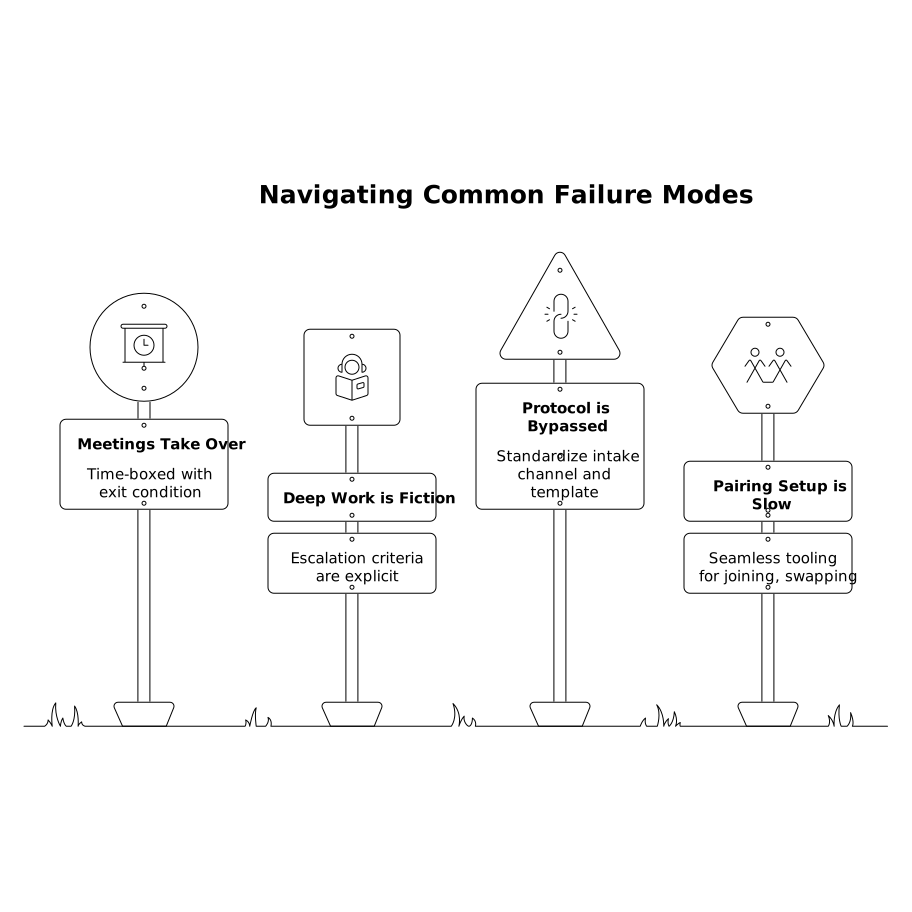
Common failure modes and how to avoid them
- “Quick help” becomes a meeting: require a time-box and a stated exit condition.
- Deep work blocks are fiction: make escalation criteria explicit and rare.
- Help requests bypass the protocol: standardize the intake channel and template.
- Pairing setup takes too long: use tooling that makes joining, swapping control, and sharing seamless so “10 minutes” stays true.